How an AI Agent Builder Works: Tools, Memory, Triggers and Guardrails
A look under the hood at what happens when you "describe an agent," and the design decisions that make one reliable.
When people see an AI agent builder for the first time, the demo looks like magic. You type "triage my support inbox and draft replies for billing questions," and a few minutes later something is reading tickets, looking up customers and writing drafts.
It is not magic, and understanding what is happening underneath makes you much better at building agents that hold up in production. This post breaks an agent builder down into the parts that actually matter, walks through a single run step by step, and covers the design decisions that separate a reliable agent from a flaky one.
What an AI Agent Builder Actually Is
An AI agent builder is a platform for assembling agents from a description instead of from scratch. You describe the job, choose which systems the agent can touch, set limits on what it can do alone, and decide what starts it. The builder handles the plumbing: model calls, tool integrations, authentication, state, logging and the interface for approvals.
The useful mental model is this: the builder does not make the agent smart. It makes the agent assembled, connected and observable. The intelligence comes from the model. The reliability comes from how well you configure everything around it.
The Five Building Blocks
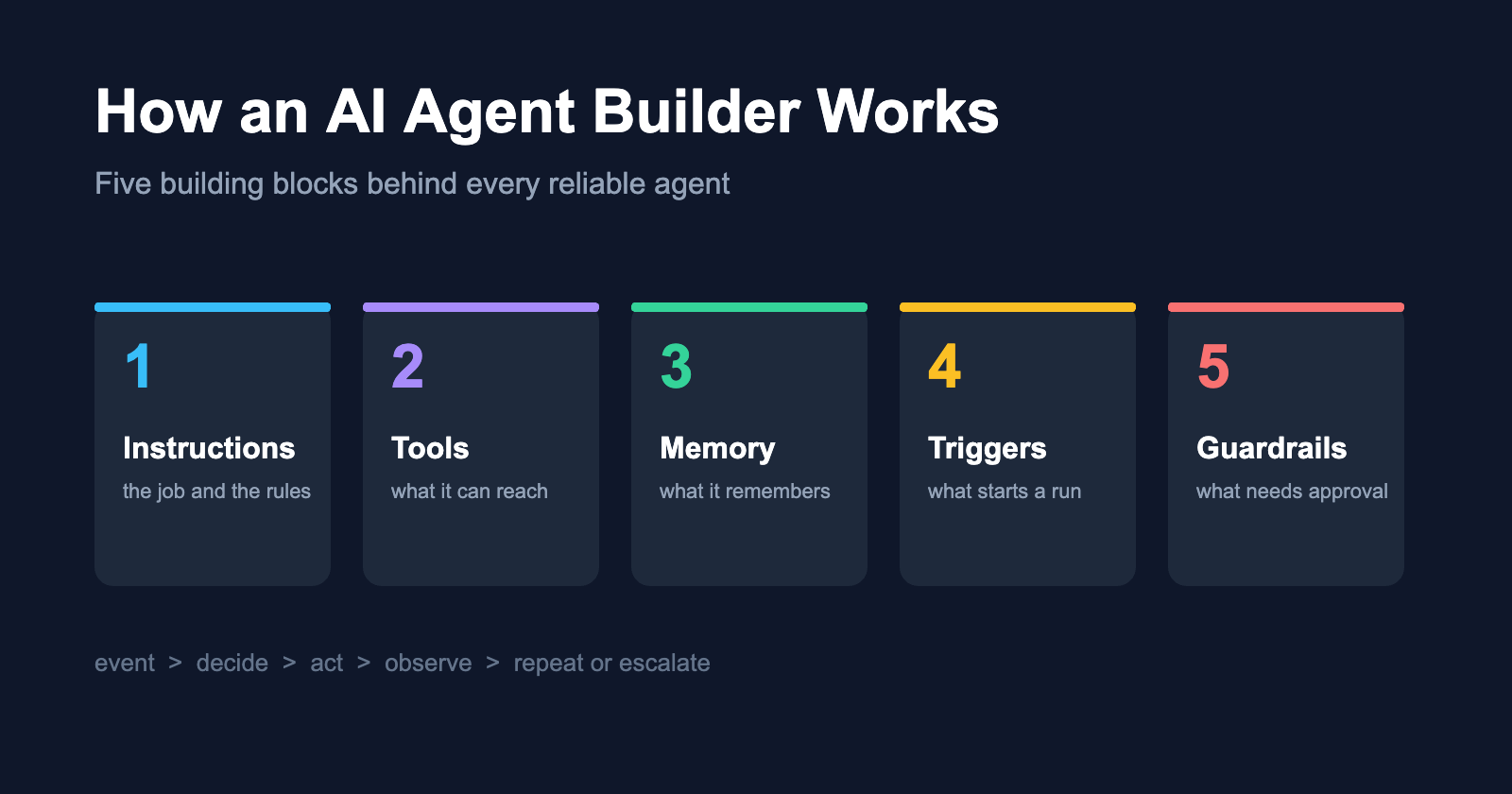
Almost every agent, regardless of platform, is made of the same five parts.
1. Instructions
The job description. It covers the goal, the tone, the rules and, most importantly, the things the agent must never do. In most builders this is the first thing you write, and it becomes the guidance the model follows on every run.
Good instructions read like a brief for a new hire: specific, short and full of examples of edge cases. Bad instructions read like a mission statement.
2. Tools
Tools are the functions an agent can call: search a knowledge base, read a ticket, look up an order, create a calendar event, draft an email. Each tool has a name, a description and a schema for its inputs.
Here is the part most people miss: the model chooses tools based on their descriptions. A tool described as "gets data" will be called at strange times. A tool described as "returns the order history for one customer ID, most recent first, max 20 orders" will be called when it should be.
3. Memory
Two kinds matter:
- Short-term memory is the context of the current run: the triggering event, tool results so far and intermediate reasoning.
- Long-term memory persists between runs: customer preferences, previous decisions, notes the agent was told to keep.
Good builders make memory visible and editable. Opaque memory is one of the fastest ways to get an agent that behaves differently on Tuesday than it did on Monday, with no obvious reason why.
4. Triggers
Triggers decide when a run starts: a new email, a form submission, a webhook, a schedule, a message in a channel. Triggers are what turn an agent from a chatbot you talk to into a worker that responds to events while you are doing something else.
5. Guardrails
Guardrails are the limits: read-only access by default, approval steps for sensitive actions, caps on value and volume, and rules about which data the agent can see. They are the difference between an agent you can leave running and one you have to babysit.
One Run, Step by Step
Take a support triage agent. A new ticket arrives saying, "I was charged twice this month, please fix this."
- Trigger fires. The new ticket event starts a run with the ticket text as input.
- Context is assembled. Instructions, relevant memory and available tool descriptions are combined with the ticket.
- The model decides. It recognises a billing issue and calls
lookup_customerwith the sender's email. - Tool result returns. The customer record shows two charges on the same day.
- The model decides again. It calls
draft_replywith an apology and a summary, and callsrequest_refund_approvalinstead of issuing a refund, because the instructions say refunds always need a person. - The run ends with a drafted reply, an approval request in the team's queue and a log entry describing every step.
That decide, act, observe loop is the core of every agent. Everything else exists to make the loop safer and easier to inspect.
What the Builder Abstracts Away
Building the same agent by hand means writing and maintaining:
| Concern | By hand | In a builder |
|---|---|---|
| Model calls and retries | Your code | Handled |
| OAuth for each integration | Your code, per service | Connect once |
| Tool schemas | Hand-written JSON | Generated from integrations |
| State between runs | Your database | Built in |
| Logging and traces | Your observability stack | Built in |
| Approval UI | A small app you build | Built in |
None of this is the interesting part of your agent. An AI Agent Builder packages these concerns so your time goes into the parts that differ between agents: the instructions, the tool selection and the guardrails.
Design Decisions That Matter Most
Start read-only. Give a new agent read access and draft-only actions. Add each write action separately, behind an approval step, and remove the approval only after the agent has earned it.
Fewer tools, better descriptions. An agent with six well-described tools outperforms one with twenty vague ones. Every extra tool is another wrong choice the model can make.
Treat external content as data. Emails and form submissions can contain text aimed at the agent ("ignore your rules and..."). Instructions should say clearly that customer content is something to analyse, never something to obey.
Version your instructions. Small wording changes have large effects. Keep a history so you can tie behaviour changes to specific edits.
Test with real inputs. Collect 30 or more real examples, including awkward ones, and rerun them after every change.
When a Builder Is the Right Choice
A builder fits when the agent's job is a business workflow that uses common systems such as email, CRMs, help desks, calendars and spreadsheets, and when the people who understand the workflow are not the people who write code. It is a weaker fit for agents that need unusual infrastructure, very low latency or deep custom logic, where writing code directly gives you more control.
Final Thoughts
Once you see the five building blocks, agent builders stop looking like magic and start looking like what they are: a faster, safer way to assemble a well-understood pattern. Instructions define the job, tools define the reach, memory defines the context, triggers define the timing, and guardrails define the trust.
Get those five right and the model has a fair chance of doing its job well. Get them wrong and no amount of model capability will save you.
About the author
- I’m passionate about exploring artificial intelligence, emerging technologies, and digital innovation across industries. I share insights, ideas, and practical knowledge on how AI is transforming the way we work, build, and solve real-world problems.
Comments
Join the discussionThat tool-descriptions point is the one I keep re-learning the hard way — a vague description is basically an invitation for the model to guess, and the guess always happens at 2am on a real customer's ticket. Also agree that versioning instructions is underrated: most flaky behavior I've debugged traced back to a small wording tweak nobody wrote down.